As part of evaluating several 3D charting packages for use in Eclipse RCP Applications I needed to get JYZ3D (http://www.jyz3d.org) working on OSX.
Jzy3d is an open source java library that allows to easily draw 3d scientific data: surfaces, scatter plots, bar charts, and lot of other 3d primitives. The API provides support for rich interactive charts, with colorbars, tooltips and overlays. Axis and chart layout can be fully customized and enhanced.
Relying on JOGL 2, you can easily deploy native OpenGL charts on Windows, Unix, MacOs (...) and integrate into Swing, AWT, or SWT. Various contributions have also made Jzy3d available for other languages/platforms such as Scala, Groovy, and Matlab.
JYZ3D is described as suitable for RCP but it requires some setup. I describe the process below in order to help others get results quicker.
First attempt
Using libraries in RCP requires packaging them in bundles and adding an OSGi MANIFEST so that they can be properly located as dependencies.
As JYZ3D requires JOGL (http://jogamp.org/jogl/www/) I looked for ways to install JOGL easily on RCP, by converting it to a bundle.
I found the tutorial by Wade Walker from 2010 that can easily be adapted to the latest version of JOGL meaning 2.3.1.
The first attempt resulted in a Exception:
java.lang.UnsatisfiedLinkError: Can't load library: /System/Library/Frameworks/gluegen-rt.Framework/gluegen-rt

As JOGL uses some interesting class loader tricks, the main library requires an Activator to insert some extra logic on start up using JarUtil.setResolver().
The resulting Activator.java is as follows:
package jogamp.osgi;

import java.io.IOException;
import java.net.URL;

import jogamp.nativewindow.Debug;

import org.eclipse.core.runtime.FileLocator;
import org.eclipse.swt.awt.SWT_AWT;
import org.eclipse.ui.plugin.AbstractUIPlugin;
import org.osgi.framework.BundleContext;

import com.jogamp.common.util.JarUtil;

/**
 * The activator class controls the plug-in life cycle
 */
public class Activator extends AbstractUIPlugin {

 // The shared instance
 private static Activator plugin;

 /**
  * Returns the shared instance
  *
  * @return the shared instance
  */
 public static Activator getDefault() {
  return plugin;
 }

 /**
  * The constructor
  */
 public Activator() {
 }
 @Override
 public void start(BundleContext context) throws Exception {
  super.start(context);
  JarUtil.setResolver(new JarUtil.Resolver() {
   @Override
   public URL resolve(URL url) {
    try {
     // System.out.println("before resolution: " + url.toString());
     URL after = FileLocator.resolve(url);
     // System.out.println("after  resolution: " + after.toString());
     return (after);
    } catch (IOException ioexception) {
     return (url);
    }
   }
  });
  plugin = this;
}

 @Override
 public void stop(BundleContext context) throws Exception {
  plugin = null;
  super.stop(context);
 }

}
There was a change in the native code library naming conventions from Java 6 to Java 7 so you must unpack the *macosx-universal jars (jogl and gluegen), duplicate al *.jnilib files to *.dylib files and repack into the jars.
Once you have done this you can run Wade Walker's example view code.

I then downloaded jars for JZY3D 0.9.1 from Maven and created a bundle using Create Bundle from jar.
The result was a lot of errors about package javax.media.opengl not being found. JXY3D relies on a much older version of JOGL and despite it being a 2.x.x. version there is definitely a compatibility break here. So much for the adoption of proper semantic versioning.
Second attempt
I downloaded the source for JXY3D from GitHub from https://github.com/jzy3d/jzy3d-api importing them as Maven projects (important step) and built the jars as Maven projects.
These depend on a newer version of JOGL (2.1.5-01) but having learned my lesson about version compatibility I created new JOGL Library plugin using the jars for version 2.1.5-01. I downloaded these from Maven Central. Again fix the native library naming issue for macosx-universal versions.
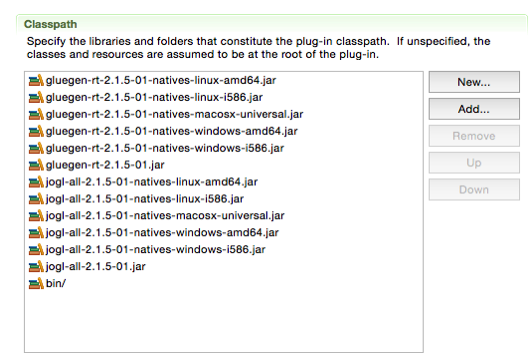
The mechanism for finding the natives changes between JOGL versions, so here the solution is to put all native jars into the same bundle as the main library.
Again add the above bundle activator, and, as this is a bundle with native jars in the root, add the bin/ folder with the Activator to the class path.
Another problem (noted by Alexis Drogoul) is a bug in FileLocator that occurs when the path contains spaces. This was also fixed on 2015-06-03
The final error purely on OSX was org.eclipse.swt.SWTError: Not implemented
java.lang.ClassNotFoundException: apple.awt.CEmbeddedFrame>
This can be solved using the magic found on stackoverflow:
SWT_AWT.embeddedFrameClass = "sun.lwawt.macosx.CViewEmbeddedFrame";
The final Activator.java is as follows:
package jogamp.osgi;

import java.io.IOException;
import java.net.URL;

import jogamp.nativewindow.Debug;

import org.eclipse.core.runtime.FileLocator;
import org.eclipse.swt.awt.SWT_AWT;
import org.eclipse.ui.plugin.AbstractUIPlugin;
import org.osgi.framework.BundleContext;

import com.jogamp.common.util.JarUtil;

/**
 * The activator class controls the plug-in life cycle
 */
public class Activator extends AbstractUIPlugin {

 // The shared instance
 private static Activator plugin;

 /**
  * Returns the shared instance
  *
  * @return the shared instance
  */
 public static Activator getDefault() {
  return plugin;
 }

 /**
  * The constructor
  */
 public Activator() {
 }
 @Override
 public void start(BundleContext context) throws Exception {
  super.start(context);
  if ("Mac OS X".equals(System.getProperty("os.name"))) {
   System.out.println("Set SWT_AWT.embeddedFrameClass");
   SWT_AWT.embeddedFrameClass = "sun.lwawt.macosx.CViewEmbeddedFrame";
  }
  JarUtil.setResolver(new JarUtil.Resolver() {
   @Override
   public URL resolve(URL url) {
    try {
      // System.out.println("before resolution: " + url.toString());
      URL urlUnresolved = FileLocator.resolve(url);
      URL urlResolved = new URI(urlUnresolved.getProtocol(), urlUnresolved.getPath(), null)
       .toURL();
      // System.out.println("after resolution: " + urlResolved.toString());
      return (urlResolved);
     } catch (IOException ioexception) {
      return (url);
     } catch (URISyntaxException e) {
      return (url);
     }
   }
  });
  plugin = this;
}

 @Override
 public void stop(BundleContext context) throws Exception {
  plugin = null;
  super.stop(context);
 }

}
And then I can also run the example code for JYZ3D.

Lessons
- Don't assume that everybody uses semantic versioning.
- Be grateful for the people who take the time to answer questions on StackOverflow.